
Obby: Battle Arena
Play next
More games

November 16, 2026 · 3 min read
Auto-Fire Survivors Games and Roguelites in the Browser
You steer, the weapons fire themselves, and every few minutes you pick an upgrade. The survivors-like format, five browser games and how to build a run that lasts.
A newer kind of game has taken over many of the most-played titles on phones and PC: you move, your weapons fire by themselves, enemies pour in, and every few minutes you pick one of three upgrades. The community calls these survivors-like games, after the game that popularized the format. The browser has versions, and they happen to be some of the best things to play when you have fifteen minutes. This post explains the format, covers the survivors-style and roguelite games on PlayKovo, and gives advice on building a character that actually survives.
What defines the format
- You only steer. Aiming and shooting are automatic, so your skill is movement and positioning.
- Enemies scale up. The screen fills over time, and surviving means moving through gaps.
- You level up mid-run. Collecting experience lets you choose upgrades that shape the run.
- Every run is different. The build you assemble changes with what you are offered, so the game stays fresh.
This makes the genre easy to start and hard to put down. You have a single control, and the interesting decisions come from the upgrade choices.
The games
Deorbit - Space Survivors
shooting

Fly, dodge, and auto-fire your way through endless alien swarms, leveling up your build mid-run.
Play now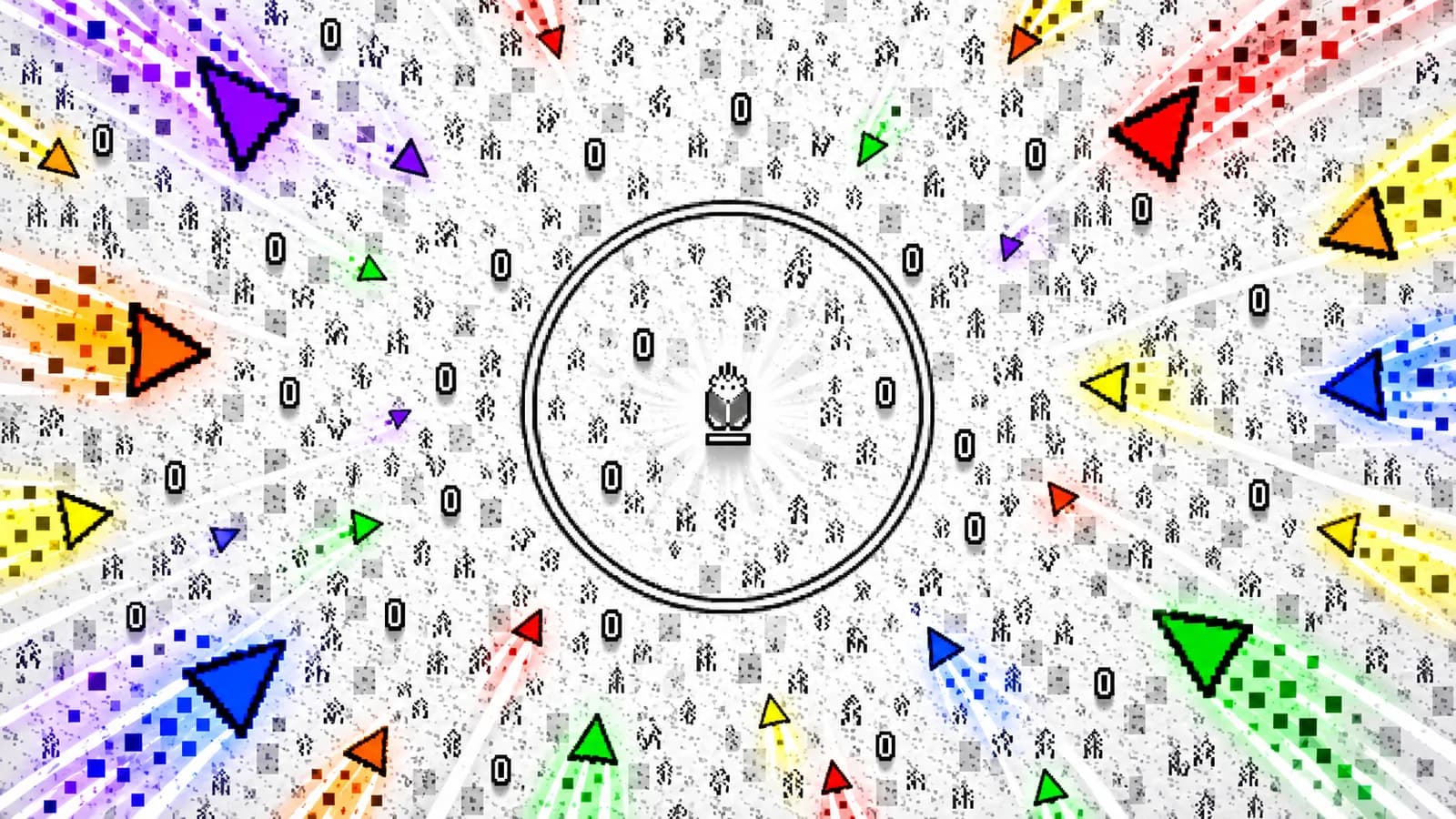

Dye Hard
action
Corporations are stealing colors from the Crystal Dimension. Fight through waves of office-supply enemies, destroy their portals, and level up in this colorful arena survival shooter.
Play nowClaw Master - Roguelike Hero
action
Arcade roguelike RPG with claw machine gameplay: grab loot, pick upgrades and beat dungeon bosses.
Play nowDeorbit - Space Survivors
Deorbit sets the format in space. A lone starship faces wave after wave of closing alien swarms with weapons that fire on their own. You collect glowing XP orbs, level up, and choose from a hand of upgrade cards for more firepower, drones, shields and new weapons. Move with WASD or arrows (or a joystick on mobile) and press F or tap to open chests.
Dye Hard
Dye Hard puts you in a field of hand-painted streaks, swarmed by animated office supplies like pens and staplers. Your character auto-fires at nearby threats while you weave through the swarm. Destroying the colored portals, shown as arrows pointing off-screen, stops new enemies from spawning. Move with WASD or the arrow keys and aim with the mouse.
Claw Master - Roguelike Hero
Claw Master mixes a claw machine with a roguelike RPG. You steer the claw to pick weapons, resources and power-ups off a board, and your hero needs them to survive procedurally generated dungeons. After each stage you choose new abilities and combine skills, weapons and bonuses into a build. It is a portrait game played with a mouse or touch.
Bounce Up!
Bounce Up! is a roguelite inspired by pachinko and peg games. You launch balls, hit pegs and land in scoring slots for combos and coins, and spend the coins on upgrades between runs to build bigger cascades.
Underrun
Underrun is a more traditional shooter, not an auto-fire game. You fight through three levels of a hacked facility, shooting spider-bots and sentry turrets and rebooting every offline CPU terminal to unlock the path forward. It is desktop only.
How to build a run that survives
- Early on, pick damage or area. Your first upgrades should deal with the crowd. A pretty defensive build with weak offence gets overrun slowly.
- Do not spread points thin. Stacking one weapon type usually beats taking one of everything. When an upgrade card improves something you already have, take it.
- Collect experience safely. Orbs on the edge of the enemy mass are often not worth the risk. Take orbs when the path is clear.
- Move in wide loops. Standing still lets swarms close the circle. Circle the arena and keep your escape route open.
- Read the card, not the picture. The upgrade name tells you what it does. Check numbers before you click, because a flashy icon is sometimes a weak upgrade.
- Treat the first run as research. You will die. Use the first few runs to learn which upgrades appear and what each does.
Why it works in a browser
One-hand movement, short runs and no commitment suit browser play. It also suits phones, since you only need a joystick. If you like the strategic build part, our posts on tower defense and zombie survival games cover related ground. Browse the survivors-like and dungeon tags for more.



Related guides
action
Heist and Police Games Online: Bank Robberies, Getaways and Chases
Plan a silent heist, raid a vault in first person, run a co-op crew or chase and escape in a car. Browser heist and police games sorted by what you actually do.
actionVoxel and Blocky Games Online: Shooters, Survival and Sandbox
Blocky worlds in the browser sorted by what you do in them: neon shooters, vehicle dogfights, mining and defending a base, and a lane-hopping arcade game.
actionBest Free 3D Games That Run Right in Your Browser
Fishing, farming, stealth, puzzles and horror: free 3D browser games with controls, plus what to do when a WebGL game runs slowly.